The Built-In Android Phone App Most Users Never Bother to Use (But Should)
Article Editorial Team
Your phone’s most honest app doesn’t even have a home screen icon.
Most smartphone users probably do not realize how much time they waste every day passively scrolling through social media feeds, watching endless short-form video clips, and fiddling with casual mobile games. Yet, for Android owners, a built-in tool designed specifically to help break these compulsive scrolling habits has likely been sitting untouched in their device settings since the day they first unboxed it. Digital Wellbeing, Google’s native usage-tracking software, has been installed over 10 billion times across the global Android ecosystem, making it one of the most widely distributed applications in computing history. Despite this massive footprint, the vast majority of users never open it on purpose. It typically arrives without a dedicated icon on the home screen, buried deep within the standard system settings menu where only the curious or intentionally health-conscious ever find it.
That oversight represents a missed opportunity, because Digital Wellbeing does far more than simply count how many times you have unlocked your phone over the course of a day. It offers a genuine behavioral snapshot detailing app usage patterns, session lengths, and notification volumes, while providing practical mechanisms to help individuals set firm boundaries around their daily screen time. Holding a solid 4.1-star rating derived from nearly 1.5 million user reviews on the Google Play Store, the application’s core functionality is both robust and well-received by those who actually engage with it.
However, the Android landscape is famously fragmented, meaning not every device runs Google’s exact iteration of the software. Major hardware manufacturers often substitute their own proprietary software suites. Samsung Galaxy smartphones, for instance, do not come with Google’s Digital Wellbeing application pre-loaded. Instead, Samsung supplies its own deeply integrated alternative. While Google requires all hardware partners to include robust screen-time monitoring and parental-control tools at the top level of the primary settings interface, it grants manufacturers the freedom to utilize either Google’s native application or an equivalent developed in-house. Samsung is far from alone in this approach, as other major global brands like Huawei have similarly chosen to ship their hardware with custom device-management tools. Generally speaking, these alternative versions offer largely the same foundational features, with individual manufacturers peppering in extra proprietary enhancements tailored to their hardware ecosystems.
What is Digital Wellbeing?
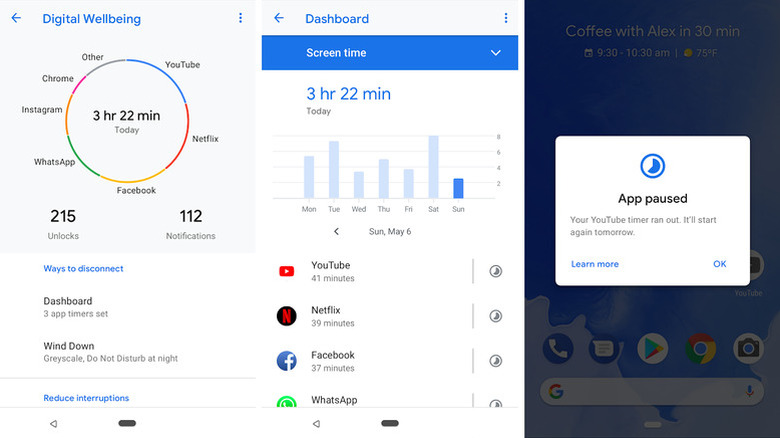
Digital Wellbeing is fundamentally a free utility developed by Google LLC and classified under the tools category on the Google Play Store. While it is pre-installed on the vast majority of modern Android devices, users must navigate through the system settings rather than looking through the standard app drawer to find it. Once launched, the interface presents users with a comprehensive daily dashboard charting their overall device habits. This dynamic overview covers total screen time, the frequency with which the device is unlocked, the sheer volume of incoming notifications received throughout the day, and a ranked breakdown of which specific applications are consuming the most attention. From that main dashboard, users can drill down into granular specifics, tapping on any individual app to examine the exact number of minutes or hours spent within its borders on any given day.
Beyond mere tracking and observation, the feature set extends into active intervention through customizable app timers. These timers allow individuals to cap their daily usage for specific programs. Once an allocated time limit is reached, the target application’s icon automatically dims and the software closes itself for the remainder of the day, with timers resetting strictly at midnight. Users can even apply these restrictions across entire categories of applications simultaneously, placing a collective stranglehold on productivity-sapping social media feeds or time-consuming mobile games.
Manufacturer alternatives often expand upon these foundations significantly. Samsung’s proprietary take on Digital Wellbeing introduces advanced analytical capabilities that compare the exact amount of time spent playing video games against the hours dedicated to social media networks, productivity tools, and finance applications. Furthermore, Samsung’s software can quietly track how often a user interacts with their device while actively driving a vehicle or walking down the street, providing safety insights that go beyond simple time management.
Practical Ways to Use Digital Wellbeing
The underlying architecture of Digital Wellbeing features several practical, built-in modes designed to help users rein in their digital consumption with just a few taps. Among these is a tool known as Bedtime mode, which automatically fades the phone’s display to a muted grayscale palette and enforces a scheduled Do Not Disturb protocol. This feature is specifically engineered to make the glowing screen less visually stimulating late at night, subtly encouraging users to put down their devices and go to sleep. Another valuable tool housed within the app is Focus mode, which allows individuals to pause particularly distracting applications with a single tap, temporarily silencing their notifications and blocking access until the user decides to re-enable them.
Samsung devices augment these core options with additional contextual modes, granting users granular control over how their phones behave in various daily scenarios. For instance, when Work mode is enabled—typically managed through the broader Modes and Routines framework—the device-management software can automatically silence the phone to vibrate-only and engage power-saving protocols. When customized properly, this mode can be triggered automatically during specific time intervals or whenever the user launches a designated professional application, such as a corporate messaging client or email portal. Because many professionals struggle to disconnect from work-related platforms outside of normal business hours, setting strict time boundaries and designated days of the week helps establish a healthier psychological separation between labor and personal life.
Advanced users can even configure these routines to trigger automatically based on geographic location, such as arriving at an office building, though enabling such location-aware automation requires the device’s GPS functionality to remain active. Similar automated profiles can be established for a wide array of environments, including attending a theater performance, operating a motor vehicle, exercising at the gym, or settling in for an evening of relaxation or gaming. Users are also free to construct entirely custom routines tailored to their unique daily routines.
Regardless of which specific version of the digital wellbeing toolkit is currently installed on a given Android device, technology experts suggest that everyday users take the time to explore these built-in menus. Evaluating personal screen time habits and understanding how native operating system tools can assist in managing digital intake offers a practical first step toward reclaiming time and attention in an increasingly hyper-connected world.
Related News